
Building and running an AI trip planner as a one-person product team
How I scoped, built and shipped an AI travel app to the App Store and Google Play, kept it running in production, and what I'd do differently. Written as a product brief, including the parts that didn't go to plan.
- Role
- Founder: product, design, engineering, release
- Period
- April 2025 – today
- Platforms
- iOS and Android, live in both stores
- Stack
- Flutter · Firebase · Genkit · Gemini
The problem
Planning a trip means stitching together blogs, maps, weather forecasts and booking sites, then turning all of it into a plan that fits your dates, your group and the weather you'll actually get. Generic AI chat can produce an itinerary, but it doesn't know the forecast, doesn't produce a packing list for it, and doesn't connect to anything you can book.
The bet
If a traveller can describe a trip in a few taps and get a day-by-day plan that fits their dates, interests and the forecast, they'll plan with it and book activities through it.
Who it was for
Leisure travellers planning city and short trips who don't want to research for hours.
How I'd measure it
Trips created per user, return visits before departure, and clicks through to activity booking partners.
What I left out
Flight and hotel booking, social features and group chat. They were out of scope until the core plan proved useful.
My role
I was the whole team: product strategy and scope, UX decisions, the Flutter app, the Firebase and Genkit backend, prompt design, store releases and incident response.
I work with AI coding agents as my engineering team. I make the product and architecture decisions, set the standards, and review and test what ships. That's how one person can build and run a production app across two stores and a cloud backend. It's also how I work on client projects.
What I built
- Trip wizard: destination, dates, travellers and interests in a few steps.
- AI itinerary: a day-by-day plan generated in one pass and stored per trip, editable afterwards.
- Weather-aware packing list based on the forecast for the destination and dates.
- Bookable activities: live tours and tickets from Viator and Tiqets, pulled through their affiliate APIs and matched to each day of the plan. Bookings earn a commission.
- Trip assistant chat that answers questions about the user's own trip.
- PDF export and sharing, plus sign-in with email, Google, Apple, Facebook or as a guest.
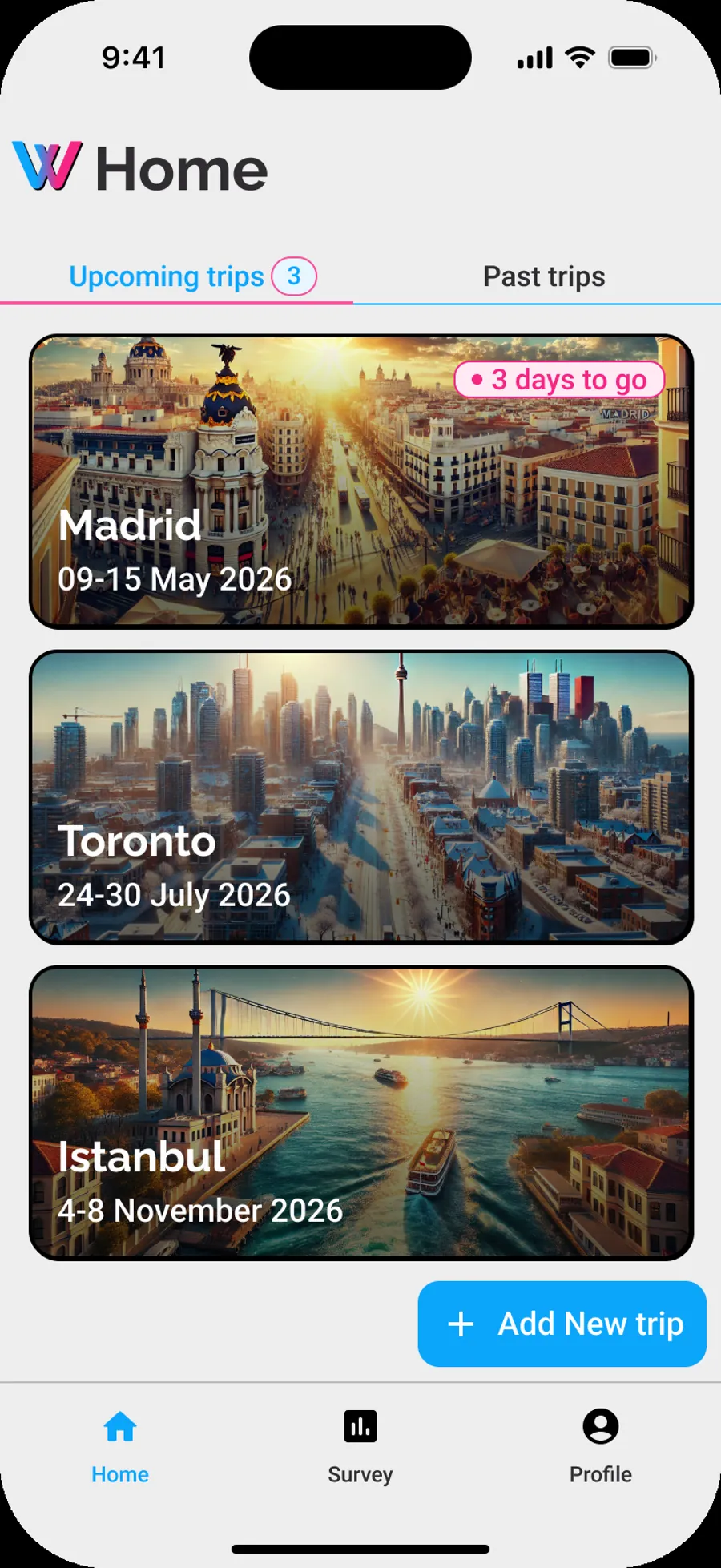
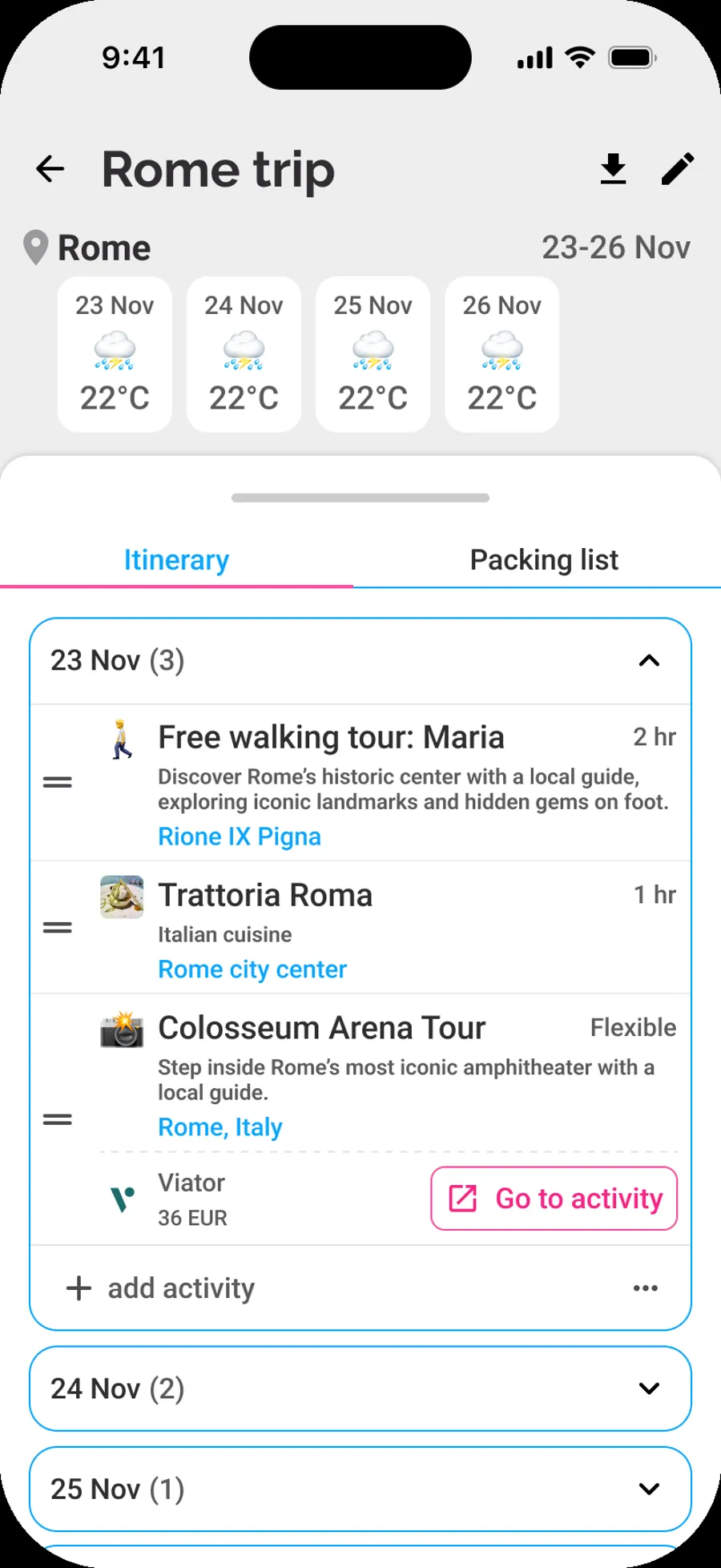
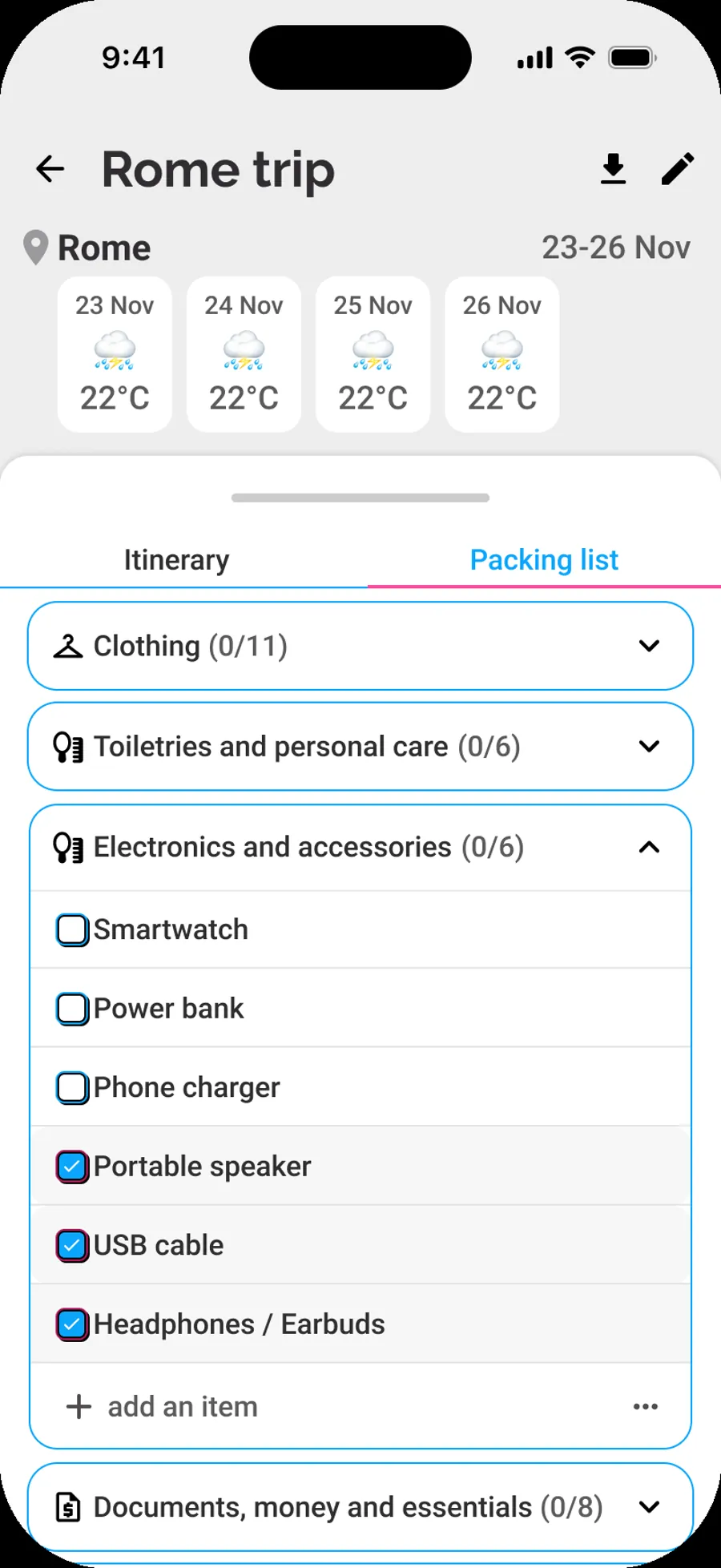
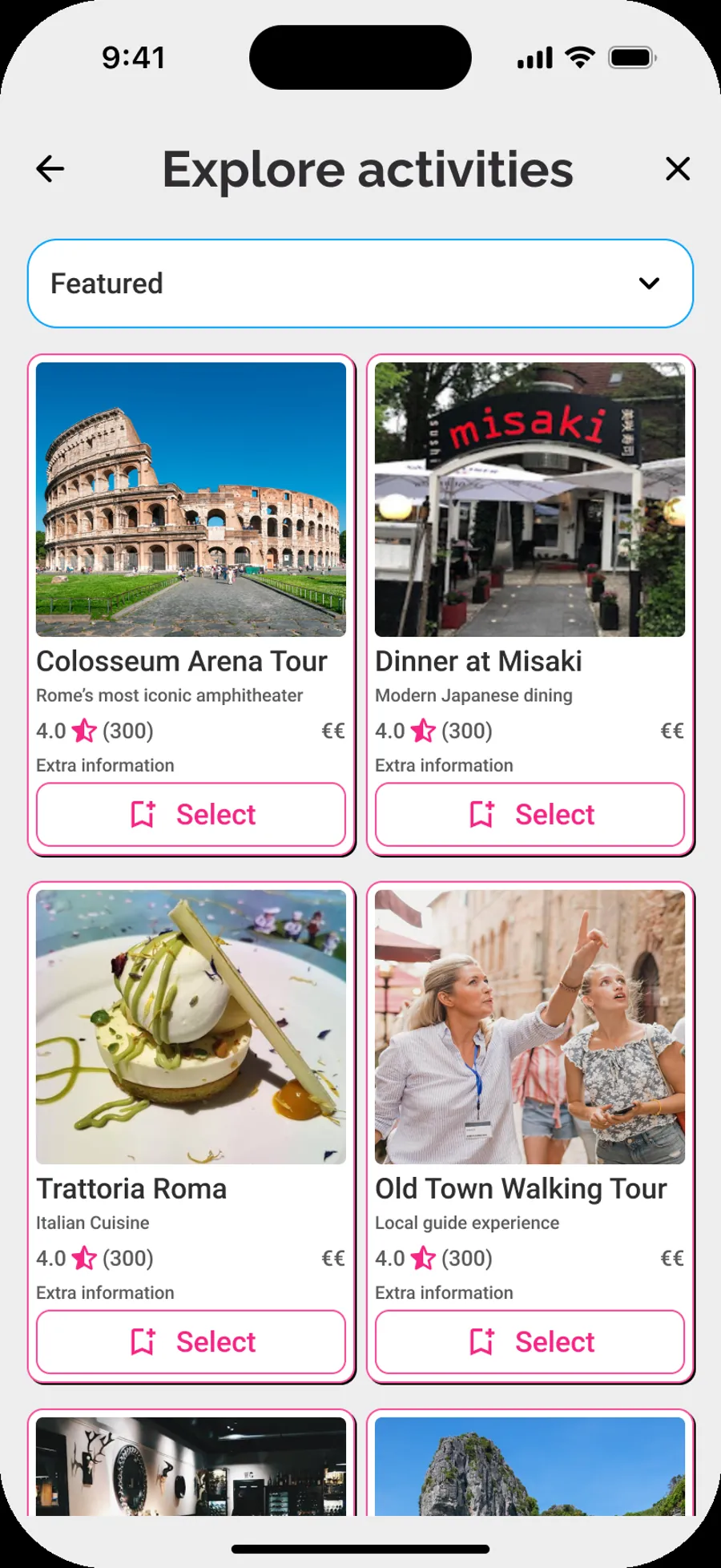
Architecture
A Flutter app on Clean Architecture, talking to Firebase. Every AI call runs server-side in Cloud Functions, so model choices, prompts and API keys never ship inside the app.
Key decisions and trade-offs
One AI call for the whole itinerary
The full multi-day plan is generated in a single call instead of one call per day, which keeps days consistent with each other and cuts round trips.
Structured output, validated by schema
Every AI response must match a defined schema before the app sees it, so users never get a half-formed plan.
A different model for each task
A stronger model for itinerary reasoning, a cheaper one for chat, packing lists and image prompts.
Partner products matched on the server
The backend calls the Viator and Tiqets APIs and matches their tours and tickets to each day of the itinerary. Partner API keys never reach the device.
Cover images are optional
Image generation is cached, and if it fails the trip still saves without a cover.
One platform: Firebase
Auth, data, functions, hosting and monitoring in one place, which suits a team of one.
Running it in production
Shipping is the start. Keeping an AI product working after launch is where most of the real work is.
Trip generation stopped working
June 2026 · AI providerWhat happened
Itineraries and cover images stopped generating with no deploy or code change. The error looked like an API key problem.
Root cause
The AI provider had retired the model versions the app was pinned to. The backend caught the error and returned an empty result, which hid the real cause.
Fix
Moved each flow to a current model, added retries with backoff for overloaded models, made failures show up as clear errors, and updated image handling for the new model.
A later Android release opened to a blank screen. I halted the staged rollout the same day, so users stayed on the working version, and fixed the start-up path.
Then I audited my own product
After that I reviewed the codebase the way an outside engineering lead would and ran a hardening sprint on what I found:
Results
What I delivered
- A production AI app, live on the App Store and Google Play
- An automated build and release pipeline to both stores
- Production issues found, contained and fixed
- AI cost kept at cents per trip by matching models to tasks
What didn't work
Usage stayed small. Building the product was the part I could control. Reaching travellers without a marketing budget was the hard part, and a consumer app lives or dies on distribution.
That changed the plan rather than the product. Travel creators already have the audience a new app lacks, so the next version of Wanderverse.ai starts with them (see what's next). Alongside it, I help travel companies that already have customers put AI into what they sell.
What's next: the Wanderverse.ai ecosystem
The planner works, but on its own it competes with every other AI trip planner. The new bet is the step before planning: people already save trips they see in travel creators' videos and blog posts, and nothing turns that inspiration into a trip they can take.
The plan: Wanderverse.ai becomes one loop, with a creator's itinerary at the centre.
- A creator imports a short video or blog post they made.
- WanderLens drafts the trip, finding the places, food and experiences in it.
- The creator verifies it place by place and publishes it with their own affiliate links.
- A traveler opens the link on the web, map first, with no install.
- WanderPlan adapts it in the app: fewer days, a different base, other creators mixed in.
Who it's for
Travel creators who want their content to become bookable trips, and the travelers who follow them.
How it earns
Creators pay for tools (planned: Free, and Pro at €15 a month). Wanderverse.ai takes no cut of their affiliate income.
The wedge
Experience. The target is under two minutes from a creator's link to a drafted trip, and a few taps for a traveler to make it their own.
The ecosystem around that itinerary: WanderLens (content to places), WanderPlan (the trip planner, live today), Wanderverse.ai Studio (where creators import, verify and publish), and later Passport (stamps and recaps), WanderNow (what's on near you) and WanderPulse (alerts for saved trips).
How it's being built
I run Wanderverse.ai as an AI agent company. I set direction and make the calls: design, releases, anything external, spending and legal. AI agents work as product managers, designers, builders, independent reviewers, QA and release managers. Every code change gets a separate review and automated tests before it reaches me for approval, the same way this website is built and deployed.
What I'd do differently
- Prove distribution before building breadth.I planned a family of four travel apps before the first had traction. In July 2026 I cut back to one app. In October I brought the ecosystem back, this time built around creators who already have an audience, with one shared itinerary at the centre instead of four separate apps.
- Set up the boring parts on day one.CI, crash reporting and security rules came after an outage. On client work they come first.
- Design for model change from the start.Models as configuration, with a retirement date and a fallback, instead of hard-coded names.
- Show progress instead of a spinner.Stream the plan day by day so the wait feels shorter, even when the AI isn't faster.
Want this for your travel product?
One clear problem, a working prototype on your data in a week, and a product that keeps running after launch.